
 Français
 Deutsch
 Español
 Italiano

 Parts & Accessories by Drone
 Drones
 Action camera
 Microphones
 Camera Stabilizers
 VR Headsets
Antigravity A1, full review: FPV enters the 360° era

Dec
The result of a collaboration between Antigravity, a newcomer to the market, and Insta360, the leader in 360° video, theAntigravity A1 is the very first FPV drone to film in 360°. This drone combines the sensations of immersive flight with the freedom of a 360° camera, recording everything around it without worrying about framing. Curious mix or real revolution? Who is this strange UFO aimed at? Are we witnessing the emergence of a new category of drone? And above all: is this the drone for you? All the answers in this article.
Antigravity A1: What you need to know
No time (or laziness 😅 ) to read it all? Here are the key points to remember about the Antigravity A1 👇
- 🛩️ Compact, lightweight folding design (249 g / 291 g depending on battery), with folding arms
- 👓 Comfortable FPV goggles with 2.5K Micro-OLED display, internal memory and remote battery
- 🎮 Intuitive, one-handed motion remote control
- 🔋 Two battery types: 2360 mAh (18-20 min real) or 4345 mAh (~30 min real), quick recharge via hub or drone
- 🚁 Two piloting methods: FreeMotion (pointing the controller) or FPV (tilting the controller sideways)
- 🧭 Always forward flight, no reverse or sideways travel, but possibility of turns, curves and rotation on the spot
- 💨 Up to 16 m/s in Sport mode (≈ 57.6 km/h) and wind resistance level 5, i.e. approx. 10.7 m/s (≈ 38.5 km/h)
- 🧱 O bstacle detection forward only, no side or rear sensors
- 👀 Total immersion flight with 360° freedom of vision
- 📡 Stable, smooth OmniLink 360 transmission (up to 10 km FCC / 6 km CE), 2K/30ips video return in headset
- 🎥 360° lenses with 1/1.28″ f/2.2 sensors, video up to 8K/30ips, 14 or 55 MP photo, free framing in post-prod)
- 🌤️ Good image quality in daylight, well-defined images, but limited dynamic range and no LOG profile.
- 📱 Automatic modes (HDR, Sky Genie, subject tracking, Sky Path routes), Insta360-inspired apps
- 💼 Three packs to choose from: Standard, Explorer (+ standard batteries, case), Infini (+ high-capacity batteries, quick reader)
📌 A unique immersive drone at the crossroads of FPV and 360° video, designed for creators ready to spend time in post-production.
Antigravity A1: Design and ecosystem
| Weight | 249 g (with standard battery) 291 g (with high-capacity battery) |
| Dimensions folded (L x W x H) | 141.3 × 96.2 × 81.4 mm |
| Dimensions unfolded (L x W x H) | 308.6 × 382.3 × 89.2 mm |
| Storage | 20 GB internal memory microSD card (up to 1 TB) |
| Class (Europe) | C0 with standard battery C1 with high-capacity battery |
The drone itself

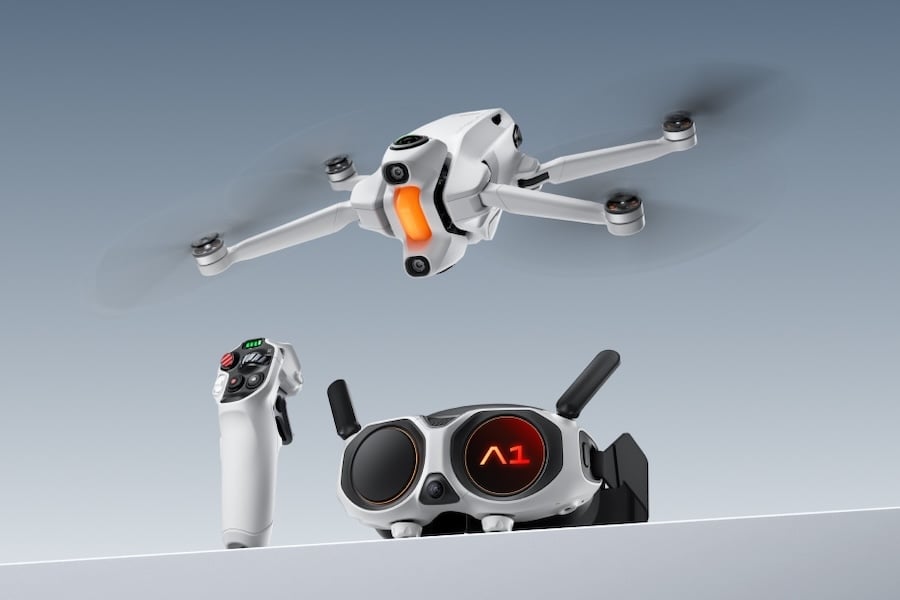
Visually, the Antigravity A1 follows the classic folding design of DJI Mini drones, with folding arms, an ultra-compact format and an all-white shell. But a number of details stand out on closer inspection. At the front, a stabilized nacelle block houses two fisheye lenses, one pointing upwards, the other downwards. Together, they cover a full 360° field of view. The drone is then automatically stitched out during editing, as on Insta360 cameras, giving the impression of a “pure” spherical image, with no visible propeller or trace of the structure.
Two small, well-integrated, forward-facing detection sensors are also noticeable at the front. Another distinctive feature is the
Another pleasant surprise: the lenses are replaceable, thanks to the same system used on the Insta360 X5. An excellent point for those wishing to replace a damaged lens without having to send the whole unit in for after-sales service.
On the storage side, there’s 20GB of internal memory, which can tide you over but remains limited for 8K video. Fortunately, the drone accepts microSD cards of up to 1TB, which are much more suitable for longer recording sessions.
Finally, as far as European regulations are concerned, two configurations are possible, as the drone can be used with two types of battery. In the standard version, it remains under the 250g mark, but with the high-capacity batteries, it exceeds this threshold and increases to 291g, which changes its classification:
- With standard battery (249 g): class C0
👉 Registration optional, no training required, flights permitted in residential areas. - With high-capacity battery (291 g): class C1
👉 Mandatory registration + online training with test to be validated (depending on country), safety distance to be maintained from people in the vicinity.
Vision Goggles

| Weight | 340,4 g |
| Dimensions (L x W x H) | 174 × 106 × 92 mm (antenna folded) 200 × 106 × 115 mm (antenna extended) |
| Internal display | Micro-OLED 1.03″, 2560×2560, 72 Hz |
| Field of view | 90° |
| Optical settings | Interpupillary distance 59-72 mm, diopter -5.0 to +2.0 D |
| Storage | 30 GB internal memory microSD card up to 1 TB |
| Recorded video | 1600×1600 at 30 fps, INSV format |
| Actual view | 1088×1088 at 50 fps |
Vision Goggles display the camera view on two 1.03″ Micro-OLED screens, with 2560 x 2560 pixel definition at 72 Hz. Video feedback is smooth and precise, and the quality is more than sufficient for comfortable flying, with good detail legibility.
On the front panel, a small secondary display provides a real-time view of what the rider is seeing, by displaying the front camera view. Convenient for a companion, this mini-screen can also display certain system status information, such as connection or goggle status, in addition to the camera view.
As for optical adjustments, the interpupillary distance is adjustable between 59 and 72 mm, and an integrated diopter correction covers a range from -5.0 to +2.0 D. However, it’s not possible to wear prescription glasses with the helmet, so you’ll have to opt for contact lenses.
The glasses are quite comfortable to wear, weighing in at around 340g, with a remote battery that attaches to the supplied neck strap. There’s 30 GB of internal storage, plus a slot for a microSD card (up to 1 TB). A nice bonus: you can review your videos directly in the goggles, in 360° immersion, to relive each flight as if you were there.
The Grip Motion Controller

| Weight | 124,3 g |
| Dimensions | 143 × 45 × 72.5 mm |
The control system is based on a motion-activated remote control, called the Grip Motion Controller, which can be used with just one hand, in the same spirit as the DJI RC Motion models. Lightweight (124 g) and compact, it connects automatically to the goggles on first use, with an interactive tutorial guiding the user step by step.
Highly intuitive, it enables fluid control of the drone simply by moving the wrist. The controller also acts as a pointer to navigate the menus displayed in the goggles, using a visible beam of light to select on-screen options.
Discover our accessories for
Antigravity A1
Antigravity A1 : Autonomy
| Drone | Glasses | Remote control | |
| Battery | 2360 mAh (standard battery) 4345 mAh (high-capacity battery) | 4500mAh | 2300 mAh |
| Autonomy | 24 minutes (standard battery) 39 minutes (high-capacity battery) | Approx. 2.5 hours | Approx. 4 hours |
| Charging time | Standard battery: 45 min (hub) / 58 min (drone) High-capacity battery: 60 min (hub) / 103 min (drone) | Not communicated | < 2.5 hours |
The Antigravity A1 is compatible with two types of battery: a standard 2360 mAh version and a high-capacity 4345 mAh battery.
- With the standard battery, we achieve a theoretical autonomy of 24 minutes, but in real-life conditions, expect 18 to 20 minutes depending on flight conditions (wind, temperature, weight on board…).
- The high-capacity battery boosts theoretical range to 39 minutes, with a more realistic flight time of around 30 minutes.
As for recharging, the standard battery takes around 45 minutes via the hub, or 58 minutes if charged directly in the drone. The high-capacity battery, a little more demanding, takes 60 minutes via the hub or up to 1h43 if left in the drone during charging.
A nice touch: just touch the back of the battery to see the charge level indicators, without even pressing a button – a neat little extra.
As for the accessories, they are far less restrictive when it comes to autonomy: the FPV goggles last around 2h30 with their 4500 mAh battery, while the radio control can be used for up to 4 hours thanks to its 2300 mAh battery.
Antigravity A1: Piloting and flight experience
| Flight modes | Cinematic, Normal, Sport |
| Control method | FreeMotion, FPV |
As with most consumer drones, the Antigravity A1 offers three classic flight modes : Cinematic, Normal and Sport. Cinematic mode softens movements for smooth shots, while Sport mode increases speed and responsiveness.
But what really changes the experience here is the way you drive. Two methods are offered:
- In FreeMotion mode, the drone moves in the direction in which you physically point the motion-sensing controller. To turn, you need to point your arm in another direction, even turning completely around if necessary. This mode offers highly intuitive control, easy to get to grips with after a few minutes’ practice.
- FPV mode, meanwhile, offers smoother piloting: simply tilt the controller to the left or right to turn the drone in that direction. Less reliant on arm movement, this mode is sometimes more comfortable, depending on the situation. Everyone can choose the one that suits them best.
In flight, the drone always moves forward: it cannot move backwards or sideways. However, it can make turns and curves, and pivot on itself when hovering. This is enough to maintain a good degree of freedom of movement, even if the approach remains very different from that of a conventional drone.
One of the most surprising aspects is that you can look all around you, even as the drone continues to move forward. Thanks to the immersive FPV system, you can fly with a 360° view of the landscape, as if you were sitting comfortably in a chair suspended in mid-air. A small vignette is displayed in the helmet when you are no longer looking in the direction of the drone, to remind you of the direction of flight.
Finally, to add a playful touch, Antigravity has integrated a virtual cockpit: for example, a 3D dragon appears beneath your feet as if you were riding it, with other elements to come via updates. Fun and original.
⚠️ Worth knowing
As with all FPV helmet-mounted immersion flights, European regulations require the presence of an observer close to the pilot, responsible for monitoring the drone’s real environment throughout the flight.
Antigravity A1: Video transmission
| Video transmission system | OmniLink 360 |
| Max. transmission distance | FCC: 10 km CE: 6 km |
| Live preview quality | 2K/30ips |
The Antigravity A1 uses the OmniLink 360 system to transmit the video stream to the FPV headset. This system offers a claimed maximum range of 10 km in FCC (outside Europe) and 6 km in CE (European standards), typical values for a drone in this category.
According to initial user feedback and independent tests, the signal is stable and reliable, as long as flight conditions remain normal. As with any drone, stability depends in particular on the presence of obstacles and the pilot’s position in relation to the drone: so, of course, you need to maintain a clear line of sight to avoid signal loss.
Video feedback is displayed in 2K at 30 frames per second in the helmet, providing a fluid image with sufficient detail for comfortable piloting.
Antigravity A1: In-flight performance
| Maximum speed | 3 m/s (Mode C) 12 m/s (Mode N) 16 m/s (Mode S) |
| Max. ascent speed | 3 m/s (Mode C) 6 m/s (Mode N) 8 m/s (Mode S) |
| Max. descent speed | 3 m/s (Mode C) 6 m/s (Mode N) 8 m/s (Mode S) |
| Max. wind resistance | 10.7 m/s (Level 5) |
The Antigravity A1 offers excellent flying performance, with a maximum speed of 16 m/s (approx. 57.6 km/h) in Sport mode. This is the fastest of the three modes (Cinematic, Normal, Sport), offering a more dynamic flying experience. As is often the case, obstacle detection is deactivated in this mode, so you simply have to be a little more attentive in complex environments.
With its goggles and grip-type controller, the A1 can be flown like an FPV drone, but is slower and less responsive than a DJI FPV or Avata 2, two models more geared towards pure performance. It is aimed more at pilots looking for an accessible immersive experience, without offering the capabilities of homemade FPV drones or those designed for acrobatics.
Wind resistance reaches 10.7 m/s (approx. 38.5 km/h), i.e. a level 5, which remains classic for a drone of this size. The drone behaves reassuringly well even when the gusts pick up, and remains stable in flight, according to early feedback.
Antigravity A1 : Features
| Photo modes | Standard photo, HDR, Rafale, AEB |
| Video modes | Standard video, Slow motion, Timelapse |
| Obstacle detection | Front and bottom binocular vision system + 3D infrared sensor at bottom of unit |
The Antigravity A1 offers a selection of classic but effective photo and video modes , including HDR, burst and exposure bracketing (AEB) for photos, and options such as slow-motion and timelapse for videos. All the essentials for capturing a wide variety of scenes, without overly advanced functions, but more than sufficient for standard use.
In terms of automated flight, the drone incorporates a system called Sky Genie, based on the main principles of DJI’s QuickShots. This includes predefined movements such as orbit, vertical takeoff, progressive distance, spiral climb and straight-line Antigravity mode, equivalent to the traditional “dronie”.
Added to this is Sky Path, a waypoint-based flight plan mode that lets you pre-program a complete route. This is a welcome addition for filming a scene following a pre-defined route, with greater regularity.
Subject tracking is also spot-on. Once the subject is selected, the system does a good job of maintaining a stable, responsive trajectory, with several options for positioning the drone around the target (front, side, back…).
For obstacle detection, the drone is equipped with a binocular vision system on the front and bottom, complemented by a 3D infrared sensor on the underside. Detection remains forward-looking (and downward-looking), but this is consistent: the drone only moves forward, so this choice doesn’t hinder practical use.
Finally, on the applications side, the A1 relies on two distinct apps : Antigravity and Antigravity Studio, both clearly inspired by Insta360 apps. If you’re already familiar with this world, you’ll want to check them out. your bearings. The interface is well designed, with a fluid, well-thought-out experience, true to what Insta360 has been offering for several years.
OUR BEST SELLERS - Antigravity A1


Accessories


Accessories
Antigravity A1: Image
| Sensor | 1/1.28 inch |
| Opening | f/2.2 |
| Photo resolution | 14 MP and 55 MP |
| Max. video resolution | 8K up to 30 fps 5.2K up to 60 fps 4K up to 100 fps |
| ISO range | 100 à 6400 |
| Max. bit rate | 170 Mbps |
| Photo format | INSP DNG |
| Video format | INSV |
Sensors and resolutions
The Antigravity A1 comes with two 360° lenses, each equipped with a 1/1.28-inch sensor with f/2.2 aperture – the same configuration as on the Insta360 X5. This duo of cameras can capture a complete 360° sphere, with the drone automatically removed from the image, as with all good immersive cameras.
The principle remains the same: framing is done after the shot, in post-production. This makes it possible to create shots that would be “impossible” with a conventional drone: camera fixed on a point, fluid back tracking around a subject, completely free perspectives… It’s all a matter of editing.
For photography, the Antigravity A1 captures images in two resolutions:
- 14 megapixels (5248 x 2624)
- 55 megapixels (10486 x 5248)
On the video side, several resolutions are available, depending on the mode chosen:
- 8K at 30 frames per second
- 5.2K at 60 frames per second
- 4K at 100 frames per second (slow-motion mode)
Image quality
In real-world use, the A1’s image quality is entirely satisfactory: videos are well-defined, colors natural, and the whole retains good legibility as long as there’s sufficient light.
That said, we’re still using 360° sensors, with their advantages in terms of framing freedom, but also their limitations. As is often the case with this type of camera, the dynamic range isa little short, and the performanceslow-light cameras stilllag behind those dedicated to conventional shooting.
Despite these limitations, the images remain largely usable, especially in good light. We can get some very beautiful, immersive shots out of them, with a rendering that’s quite convincing for conventional broadcasting or on networks.
Finally, no LOG profile or raw format is offered. We only shoot in automatic mode, with directly usable output. It is still possible toadjust certain parameters manually, such as exposure, white balance or ISO, but the absence of a LOG profile limits the possibilities for advanced calibration in post-production.
Antigravity A1: Packs and prices

ℹ️ Note: some links in this section are Amazon affiliate links. As Amazon Associates, we earn from qualifying purchases, at no extra cost to you.
| Standard package | 1399 € |
|
| Explorer Pack | 1599 € |
|
| Infinity Pack | 1699 € |
|
The Antigravity A1 is available in three packs, with varying levels of content depending on the intended use:
- Standard pack (€1399 ): drone, FPV goggles, radio control, flight battery, small carrying case for drone and four spare propellers.
- Explorer Pack (€1,599 ): all the contents of the standard pack, plus two additional batteries (for a total of three), a charging station, a shoulder bag and eight spare propellers.
- Infini Pack (€1699): same basis as Explorer Pack, but with three high-capacity batteries instead of the standard ones, and the addition of a fast drive for file transfer.
An optional lens replacement kit is available for €36. The brand also offers an Antigravity Care plan, with replacement in the event of accidental loss or breakage.
In terms of price, the A1 is clearly not an entry-level drone. But it’s important to bear in mind that we’re talking about an all-in-one package: drone, goggles, remote control, batteries, charger, storage… it doesn’t get much more complete than this. And unlike DJI, Antigravity doesn’t have a giant factory or massive production volumes behind it. The price is therefore understandable, even if it remains high and not necessarily accessible to all pockets.
Conclusion Antigravity A1: a drone apart, ambitious and original
The Antigravity A1 is unlike any other drone on the market today. The first model of its kind to combine immersive flight and 360° video, it inaugurates a new approach to both piloting and video creation. It’s not (yet?) a large-scale game changer, but clearly a device in a class of its own, with a real personality and a unique proposition.
It’s hard to imagine that this is a first attempt for this new brand, so accomplished is the product : meticulous design, reliable transmission, decent battery life, convincing video feedback, solid application… Everything is there to offer a coherent, well-thought-out experience.
Nevertheless, this drone remains a niche product. It’s expensive, a little demanding in terms of assembly, and aimed at a well-targeted audience. But if you’re in that target market, the A1 could well become your favorite toy.
Who is the Antigravity A1 really designed for?
- 🎥 Content creators: if you’re looking for original angles, impossible shots or an immersive, dynamic 360° video, this is an excellent tool – provided you’ve mastered a minimum of editing.
- 🕹️ Immersive flight enthusiasts: perfect for those who dream of FPV sensations without the need for an acrobatic drone or a complex setup.
- 📸 360° camera fans: if you already love the Insta360 universe and want to take it to the next level by adding the dimension of flight, you’ll clearly be on target.
- ❌ But if you hate post-production, are tired of just opening editing software, or are just looking to capture beautiful images ready to post… move on. Like all 360° cameras, the A1 requires time and a minimum of post-production effort.
💡 Also read
➡️ Looking for a more accessible drone that combines selfie, automatic tracking and a little taste of FPV? Check out our DJI Neo 2 test!
➡️ DJI also offers its own take on the 360 FPV drone with the DJI Avata 360, a more accessible and versatile hybrid model. Also check out our DJI Avata 2 vs Avata 360 comparison to better understand the differences between the two drones.
🛠️ For maintenance and repairs, you can find all compatible parts here:
Antigravity A1 Parts

 Blog