
 Français
 Deutsch
 Español
 Italiano
 Parts & Accessories by Drone
 Drones
 Action camera
 Microphones
 Camera stabilizers
 VR Headsets
Insta360 Flow Pro vs DJI Osmo Mobile 6: which stabilizer to choose?

Sep
Until recently, DJI was the undisputed master of the smartphone stabilizer market. After years of refinement, its models have become must-haves for content creators. But the arrival of the Insta360 Flow has changed all that, quickly establishing itself as a serious alternative. With the release of Insta360 Flow Pro, the manufacturer known for its 360-degree cameras raises the bar even higher, while remaining in the same price range. So, Insta360 Flow Pro vs DJI Osmo Mobile 6: which is the best stabilizer? Which best suits your needs? Check out our full comparison to make the right choice!
Insta360 Flow Pro vs DJI Osmo Mobile 6: Technical specifications
Let’s get to the heart of the matter! Let’s take a look at the technical specifications of the two stabilizers, side by side, to better understand what they have to offer.
| Insta360 Flow Pro | DJI Osmo Mobile 6 | |
| Weight | 366 g (+ 32g for magnetic holder) | 305g (+ 25g for magnetic backing) |
| Dimensions (L x H x W) | 162.1 x 79.6 x 36 mm (folded) 269.4 x 73.6 x 69.9 mm (unfolded) | 189 x 84.5 x 44 mm (folded) 276 x 111.5 x 99 mm (unfolded) |
| Tripod dimensions | Length: 80 mm Diameter: 187.6 mm | Length: 138 mm Diameter: 32 mm |
| Weight Tripod | Included in total weight | 72 g |
| Length of selfie pole | 215 mm | 215mm |
| Rotation range | Pan: 360° continuous rotation Roll: -150° to 180° Tilt: -100° to 82 | Pan: -161.64 to 173.79° Roll: – 120.30 to 211.97° Tilt: -101.64° to 78.55 |
| Autonomy | 10 hours | Approximately 6h24 |
| Charging time | 2 hours | Approximately 1h24 |
| Connectivity | USB-C Bluetooth 5.0 | USB-C Bluetooth 5.0 |
| Compatible phones | Width: 64 to 84 mm Thickness: 6.9 to 10 mm Weight: 130 to 300 g | Width: 67 to 84 mm Thickness: 6.9 to 10 mm Weight: 170 to 290g |
Insta360 Flow Pro vs DJI Osmo Mobile 6: Design

Anatomy of the two devices
Like all self-respecting mobile stabilizers, the Insta360 Flow Pro and DJI Osmo Mobile 6 consist of two essential parts: a handle with integrated control interface, featuring a ¼-inch screw thread on the base for tripod mounting, and an arm to hold your smartphone, equipped with a three-axis stabilized cradle. This cradle guarantees smooth video worthy of Hollywood productions.
In addition to stabilization, both models feature two additional functions:
- Selfie pole: their handle is telescopic, transforming into a selfie pole with a length of 215 mm. Both stabilizers feature a rotating head, enabling the angle of the smartphone to be adjusted. In this respect, they are identical.
- Tripod: Both models feature a tripod function for vertical positioning, ideal for hands-free shooting with subject tracking. However, the design differs slightly: the Flow Pro’s tripod is integrated directly into the handle, while the DJI’s is a separate accessory that screws into the underside of the handle. While the Flow Pro’s tripod integration is more practical, it is less rigid and robust than that of the OM6.
When it comes to attaching the smartphone, both stabilizers use an effective magnetic system, consisting of a magnetized clamp that is attached to the back of the phone. This allows the smartphone to be attached in a fraction of a second. A small advantage of the Flow Pro: you can leave the clip attached to the stabilizer once folded, whereas on the OM6, you’ll need to detach it and store it carefully to avoid losing it.
The Insta360 Flow Pro also has a few extra assets that its DJI rival doesn’t offer:
- A USB-C output located at the top of the arm, which lets you recharge your smartphone, transforming the stabilizer into an external battery.
- A Cold Shoe port at the base of the arm, perfect for attaching an external microphone and enhancing the audio quality of your videos.
Both devices boast an elegant design and give a good impression of quality. That said, the slightly larger DJI looks a little more robust than the Flow Pro.
Size, weight and ergonomics
Folded up, both stabilizers are ultra-compact and slip easily into a bag or even a jacket pocket. However, the Osmo Mobile is slightly larger than the Flow Pro, measuring 189 x 84.5 x 44 mm versus 162.1 x 79.6 x 36 mm. When unfolded, the difference is still visible, with the OM6 measuring 276 x 111.5 x 99 mm vs. 269.4 x 73.6 x 69.9 mm. for the Flow Pro. The Flow Pro wins out in terms of compactness.
This size difference is partly explained by the OM6’s longer handle, offering a more comfortable grip. Conversely, the Flow Pro’s handle might seem small for larger hands, but the included grip helps compensate. What’s more, you can use the non-deployed tripod to extend the grip.
In terms of weight, the OM6 has the advantage for long shooting sessions, weighing in at 305g versus 366g for the Flow Pro. However, this difference can be explained: the Flow Pro’s weight includes its built-in tripod, whereas the OM6’s tripod, which is a separate accessory, is not counted in the official weight. If you use the OM6’s tripod screwed on, for example to extend the length of the selfie pole, the total weight climbs to 377g, making it slightly heavier than the Flow Pro.
In terms of compatibility, both stabilizers are designed for a wide range of smartphones. The Flow Pro can accommodate narrower phones (from 64 mm, vs. 67 mm for the OM6), but also lighter and slightly heavier ones (from 130 to 300 g, vs. 170 to 290 g for the OM6). g for the OM6). So if you have a very thin, very light or very heavy cell phone, the Flow Pro could be the best option.
Getting started
Insta360 Flow Pro and DJI Osmo Mobile 6 switch on automatically as soon as you open them, ready for use in an instant. No need to manually balance the phone, a real time-saver. What’s more, a notification appears on your smartphone as soon as you switch them on, giving you direct access to their dedicated application. Practical, isn’t it?
The Flow Pro has a slight advantage, however, with an even quicker start-up than its rival. With the OM6, you first have to unlock it, then rotate the ball-and-socket joint between the handle and the arm, and finally attach your phone. With Flow Pro, everything is simplified: just two steps. Simply attach your phone, open the device and you’re ready to shoot.
Another highlight of the Flow Pro, especially for iPhone users, is its compatibility with Apple DockKit. Thanks to NFC pairing, the first connection is child’s play: just touch the NFC logo on the handle with your iPhone, and voila, the two devices connect in seconds. After that, the connection is made automatically each time the device is used.
User interface
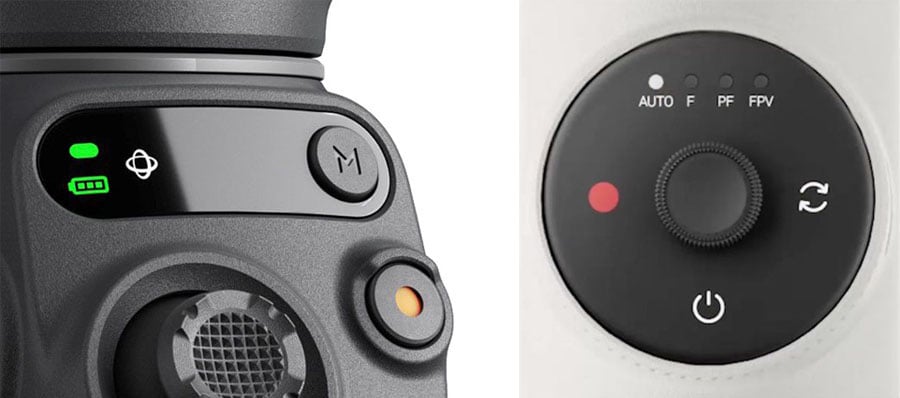
Although the controls are laid out differently on the Insta360 Flow Pro and DJI Osmo Mobile 6, their functionality remains quite similar.
- The Insta360 Flow Pro features the SmartWheel, a round control panel on the front. It includes luminous indicators for the selected mode, physical buttons (on/off, switch and record), a joystick, a perimeter wheel, a tactile surface, and a trigger on the back of the handle.
- The DJI Osmo Mobile 6, meanwhile, features a small display on the front to indicate charge level and active mode. It is equipped with physical buttons (M button for mode change and record button), a joystick, a small side-mounted thumbwheel and a trigger on the rear.
For those who wish to go into more detail about the features associated with each button, we recommend that you consult our full tests:
➡️ Insta360 Flow Pro : full review
➡️ DJI Osmo Mobile 6 : full review
Each interface has its strengths and limitations. Here is a summary of the main advantages of each model:
Flow Pro benefits :
- Touchscreen interface: although not always perfectly responsive, it allows you to change the stabilization mode in both directions (front and rear), whereas the OM6 can only do this in one direction.
- Camera switching during recording: You can switch between the phone’s front and rear cameras without interrupting recording, a real plus for vloggers. The OM6, on the other hand, requires you to stop the video to make this change.
- Trigger forward/backward rotation: three presses of the trigger turn the phone upside down, a feature absent on the OM6.
- Zoom wheel: This not only zooms in and out, but also switches between the smartphone’s various cameras (wide-angle, telephoto, etc.), allowing you to film without loss of quality.
Benefits of Osmo Mobile 6 :
- Ergonomic joystick: Wider and more sensitive to pressure, it offers better control of movements, allowing you to adjust their speed according to the force applied. On the Flow Pro, movements are made at a single speed.
- Multifunction side wheel: in addition to zoom, it also adjusts focus, a feature absent on the Flow Pro.
Overall, the Flow Pro interface is more complete. It allows you to manage more parameters without touching the application, such as multimedia playback, whereas on the OM6, you’ll often have to return to your phone for certain adjustments.

Discover our accessories for
Insta360 Flow Pro
Insta360 Flow Pro vs DJI Osmo Mobile 6: Features
Stabilization modes
First and foremost, it’s worth pointing out that both stabilizers, the Insta360 Flow Pro and the DJI Osmo Mobile 6, excel in their main role: stabilization. You’ll get incredibly smooth, stable video with both models, without really being able to tell one from the other in this respect.
Each offers several stabilization modes, which influence the way the rig moves, modifying the final effect. Although movements remain fluid, these modes define the axes along which the camera can or cannot move.
Both stabilizers offer 3 main modes (although the names sometimes vary from brand to brand):
- Follow mode (Insta360) / Suivre (DJI): The gondola follows horizontal (pan) and vertical (tilt) movements, while the roll axis remains locked for maximum stability.
- Pan Follow mode (Insta360) / Tilt Lock (DJI): Here, the camera follows only horizontal movements (left/right), locking tilt and roll, ideal for shots with a perfectly stable horizon.
- FPV mode (same name on both models): This mode frees the nacelle in all axes for immersive, dynamic shooting, mimicking the movements of FPV drones. Perfect for spectacular, motion-packed videos.
On the Flow Pro, the selected mode is displayed via a luminous indicator on the handle (the first letter of the mode), while on the OM6, a symbol appears on the mini-display.
Flow Pro also offers an additional mode: Auto mode, which lets the stabilizer automatically choose the mode according to your movements. Practical for those who prefer a no-fuss experience.
Subject follow-up
The Insta360 Flow Pro and DJI Osmo Mobile 6 both feature high-performance subject tracking: Deep Track 3.0 for the Flow Pro and ActiveTrack 6.0 for the OM6. All you have to do is select a target (person, animal, object, vehicle, monument, etc.), and the stabilizer ensures that it is always centered in the frame.
Both models rely on algorithms, or artificial intelligence, to recognize and track their targets, even in motion. While both do a good job of this, theInsta360 Flow Pro sets itself apart by pushing the boundaries even further.
For example, if you leave the frame and then reappear, the two stabilizers will find you without a hitch. But Flow Pro goes even further : it can even recognize you if you’ve changed clothes! It’s also capable of tracking an object whose shape changes according to the angle of view, which is pretty impressive.
Another major advantage of the Flow Pro is its 360° continuous rotation on the panoramic axis. This means you can rotate indefinitely around the camera without ever being out of frame. By contrast, the OM6 is limited to a 335° rotation range on this axis. This means that once the 335° movement is reached, it will have to turn back to follow you, somewhat limiting your freedom of movement.
The Insta360 Flow Pro also offers a significant bonus for iPhone users: thanks to its Apple DockKit compatibility, it can use subject tracking not only in the Insta360 app, but also with the iPhone’s native camera app and over 200 third-party applications. So you can take advantage of tracking during video calls, lives or online meetings.
Finally, the Flow Pro offers the option of combining subject tracking with slow-motion mode, and zooming up to the maximum limit of your smartphone. The OM6, on the other hand, is limited to a 3x zoom in tracking mode.
Other features
Insta360 Flow Pro and DJI Osmo Mobile 6 don’t just stabilize your videos. They also offer a range of creative features reminiscent of action cameras, allowing you to add a cinematic dimension to your shots.
The two devices have similar modes. Here are the ones they have in common:
- Timelapse: Create time-lapse videos.
- Hyperlapse (DJI) / TimeShift (Insta360): Time-lapse videos, but this time in motion.
- DynamicZoom (DJI) / Dolly Zoom (Insta360): To recreate the well-known “Vertigo” effect, where the subject appears motionless while the background stretches.
- Panorama: wide-angle shots with a range of options. Both stabilizers offer 240° and 3×3 panoramas. The Flow Pro can go even further with 180° and 360° shots, while the OM6 offers CloneMe mode, where the subject appears several times in the same photo.
- Gesture control: activate video with a simple wave of the hand. The OM6 can also take photos using this function.
Each model also has its little extras:
- OM6: Story mode offers a series of automated templates for creating clips ready to post on social networks in the blink of an eye.
- Flow Pro: Shot Genie mode gives you ideas for musical shots that you can recreate step by step. It also features a Barrel mode, which rotates your smartphone like an FPV drone, for a spectacular effect.
OUR BEST SELLERS - Insta360 Flow Pro


Insta360 Flow Pro
Sticker Film Integral Waterproof Protection for Insta360 Flow Pro Camera Stabilizer


Bags Cases Straps
Insta360 Flow Pro vs DJI Osmo Mobile 6: Mobile applications
The Insta360 Flow Pro and DJI Osmo Mobile 6 each offer dedicated apps for iOS and Android, enabling you to exploit all their features and easily set the various options. These apps also include editing tools, color settings and beautifying filters for fine-tuning your videos directly from your phone.
Both applications, DJI Mimo and Insta360, are very similar in terms of appearance and functionality. What sets them apart, however, is their ease of use and intuitive interface, making them quick and easy to learn. So it’s hard to pick a winner here.
However, one point to note: some Android users may notice that certain functions are not available on all smartphone models. This little drawback exists on both the DJI and Insta360 apps. So, whether you opt for one or the other stabilizer, your experience will be even better if you use an iPhone.

Discover our accessories for
DJI Osmo Mobile 6
Insta360 Flow Pro vs DJI Osmo Mobile 6: Autonomy
The Insta360 Flow Pro far surpasses the DJI Osmo Mobile 6 in terms of battery life. Although the Pro version has lost two hours of use compared with its predecessor (the Flow), it still offers an impressive 10 hours of autonomy, more than half that of the Osmo Mobile 6 ‘ s 6 hours 24 minutes. While the OM6’s autonomy remains sufficient for most uses, those planning to film long sessions should clearly turn to the Flow Pro.
This long battery life also means that the Insta360 Flow Pro can be used as an external battery. Thanks to a USB-C port located on the upper arm, you can recharge your smartphone while filming, a real plus when you know how quickly a mobile’s battery can run down. And don’t worry, this function in no way affects the stabilizer’s performance.
As for recharging, both models plug in via USB-C and recharge fairly quickly. The DJI Osmo Mobile 6 recharges slightly faster(1h24 vs. 2 hours for the Flow Pro), which is explained by its smaller battery capacity.
Insta360 Flow Pro vs DJI Osmo Mobile 6: Price

ℹ️ Note: some links in this section are Amazon affiliate links. As Amazon Associates, we earn from qualifying purchases, at no extra cost to you.
| Insta360 Flow Pro | DJI Osmo Mobile 6 | |
| Standard package | 159€ | 149€ |
| Pack with additional accessories | 194€ (Pro Tripod Pack) | 398€ (Bundle Osmo Mobile 6 Vlog) |
The Insta360 Flow Pro and DJI Osmo Mobile 6 are in the same price range, with only a small difference: €159 for the Flow Pro versus €149 for the OM6, a difference of just €10.
The Flow Pro’s standard package includes the stabilizer, a magnetic clamp to secure your smartphone, a silicone coating for a better grip, a protective cover, and a USB Type-C to Type-A charging cable.
The standard OM6 package includes the stabilizer, a magnetic clip for your smartphone, a folding handle/tripod, a storage pouch and a charging cable.
Both stabilizers are also available in packs with additional accessories, although comparison between these two packs is difficult, as the accessories included are very different:
- The Vlog Osmo Mobile 6 pack goes much further, including a DJI Mic external microphone with complete accessories: a receiver, two transmitters, a windscreen, magnetic clips, a carrying pouch, plus various cables and adapters. The package is priced at €398.
- The Insta360 Flow Pro Tripod Pack adds a simple multifunction tripod to attach to the stabilizer base. This pack is priced at 194€ on the official store.
OUR BEST SELLERS - DJI Osmo Mobile 6


DJI Osmo Mobile 2
Universal Action Camera Adapter for DJI Osmo Mobile 2 3 4 5 6 7 7P 8 SE Camera Stabilizer


DJI Osmo Mobile 2
Strap for DJI Osmo Mobile 2 3 4 5 6 7 7P 8 SE Camera Stabilizer


Conclusion Insta360 Flow Pro vs DJI Osmo Mobile 6: Which to choose?
In short, the Insta360 Flow Pro and DJI Osmo Mobile 6 are both excellent stabilizers, arguably the best available on the market today. Their main mission – to stabilize your images for smooth, professional videos – is perfectly fulfilled by both models.
That said, if we had to choose one, theInsta360 Flow Pro stands out as the best option. For a price almost identical to that of the OM6, it offers several notable advantages: more powerful subject tracking, the ability to continuously rotate 360°, far superior autonomy, an integrated tripod, an external battery function, and ultra-fast start-up (especially for iPhone users), to name just a few of its strengths.
That’s not to say that the DJI Osmo Mobile 6 doesn’t have its strong points. It’s still an excellent choice, with a slightly more robust construction (especially its tripod, although it’s not integrated) and a more precise joystick for better motion control.
However, Insta360 has clearly studied its competitor and improved on several aspects. At almost the same price, Flow Pro simply offers you more functionality and flexibility.
To find out more, explore our full tests of the two stabilizers in this comparison Insta360 Flow Pro vs DJI Osmo Mobile 6:
➡️ Insta360 Flow Pro: full test
➡️ DJI Osmo Mobile 6: full test

 Blog
Blog